Clinical case auditing and therapeutic options
Support tutorial for using the automated clinical audit agent

How to generate a therapeutic options report from an oncology clinical case
Reviewing the available evidence for a single oncology patient can take hours: pivotal trials, recent meta-analyses, NCCN, ESMO, or ASCO guidelines, eligibility criteria, and subgroup data that apply to that specific patient's profile and not another's. In real-world clinical practice, that time is almost never available.
The therapeutic options report feature in Marco does that work for you.
You provide the clinical case, and Marco searches through available medical evidence and current clinical guidelines, returning an in-depth report with the therapeutic options applicable to that patient. If the patient is already undergoing therapy, it also evaluates that therapy in light of the evidence.
It is designed both for professionals working on a case-by-case basis and for organizations—oncology boards, insurers, second-opinion teams—that need to standardize evidence review across different patients and teams.
Here is the step-by-step guide.
Step 1: Open the agent selector
On the home screen, below the message box, you will see a brain-shaped icon. Click there to display the list of available agents.
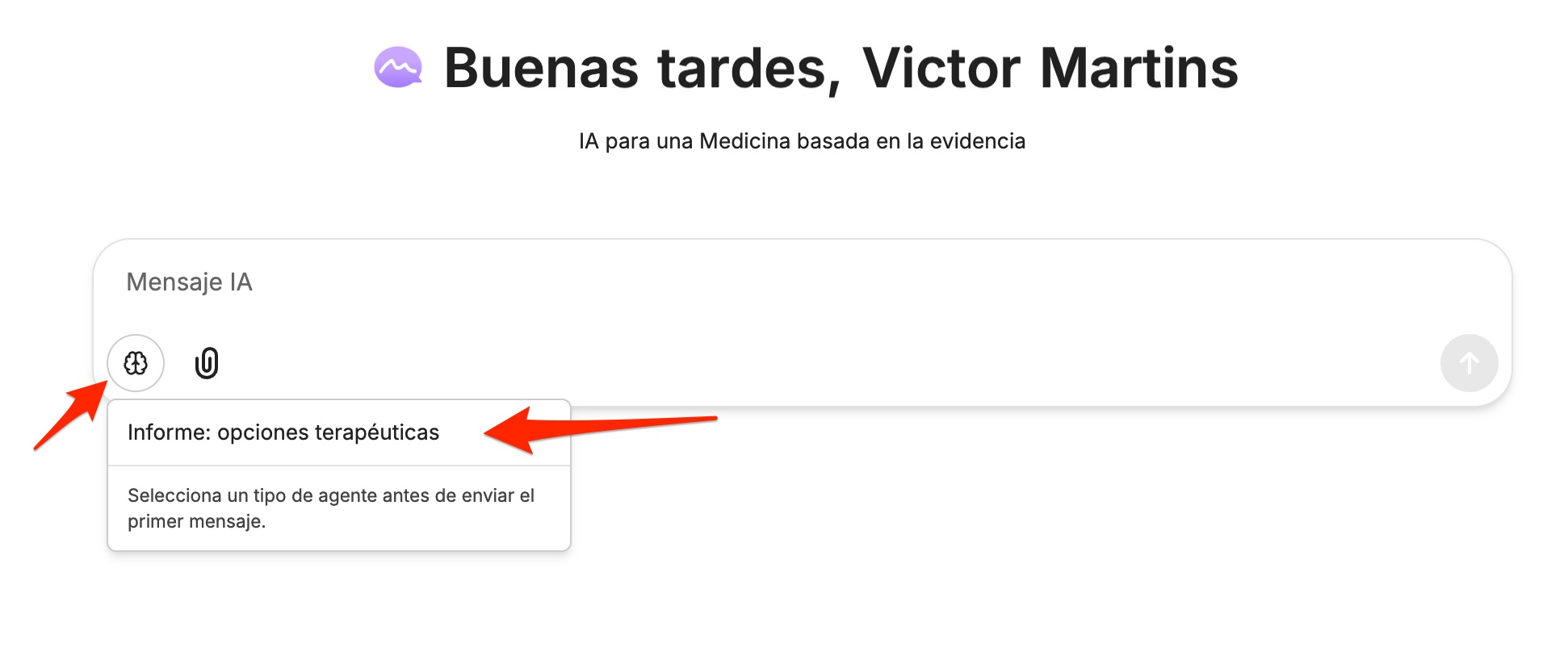
An important detail that the interface itself reminds you of: select the agent type before sending the first message. The agent defines how Marco will work throughout the entire conversation, so it is best to choose it before typing anything.
Step 2: Select "Report: therapeutic options"
In the menu that appears, click on Report: therapeutic options.
Step 3: Verify that the agent is active
You will know it is selected because a tag appears to the right of the message box: Agent: Report: therapeutic options. The help text in the box also changes to tell you exactly what to do next.
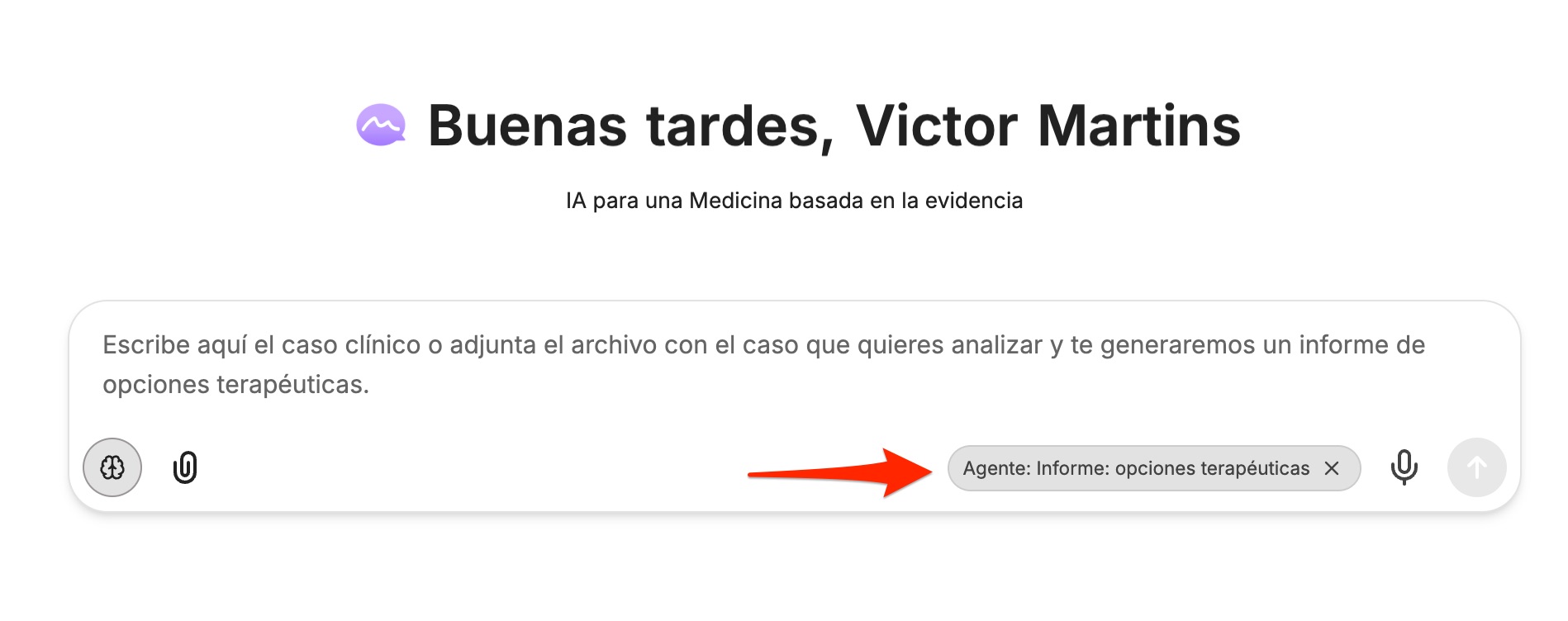
If you want to switch agents, simply click the X on the tag and choose another one.
Step 4: Enter the clinical case
You have two options, and both work equally well:
- Type or paste the case directly into the message box.
- Attach a file with the case using the paperclip icon. An epicrisis, a chart, a pathology report, or a document containing several of these elements will work.
You do not need to format or structure it beforehand. Marco interprets clinical text exactly as it is written.
Step 5: Send and review the report
Press the send button. Marco searches the evidence and clinical guidelines and builds the report. Once finished, you can continue the conversation in the same thread to delve deeper into a specific option, ask it to compare two alternatives, or explain the basis for a specific recommendation.
What to include in the case for a better report
Marco works with the information provided. The more complete the case, the more tailored the report will be. These are the details that have the greatest impact on the quality of the results:
- Patient details: age, sex, relevant comorbidities, and functional status (ECOG or Karnofsky).
- Diagnosis: histological type, stage, and date of diagnosis.
- Molecular profile and biomarkers: for example, EGFR, ALK, ROS1, HER2, PD-L1, MSI/MMR, BRCA, KRAS. This is likely the data that most significantly changes the range of options.
- Extent of disease: sites involved and pattern of metastasis.
- Treatment history: previous lines of therapy, response achieved, toxicities, and reason for discontinuation.
- Current therapy, if any: regimen, dosage, and start date. This information allows Marco to evaluate the ongoing treatment.
- Relevant lab results: renal and liver function, blood count, and tumor markers.
- Context: patient preferences, access to medications, and coverage or availability within your healthcare system.
Best practices
Anonymize the case. Remove names, ID numbers, addresses, and any other data that could identify the patient before uploading. The report loses no clinical utility without these fields.
Cross-reference the citations. The report is based on literature and guidelines; reviewing the cited sources is part of clinical work and allows you to verify that the evidence is truly applicable to your patient.
An important clarification
The therapeutic options report is a clinical decision support tool intended for healthcare professionals. It synthesizes and organizes evidence, but it does not replace the judgment of the treating team, direct patient evaluation, or tumor board deliberation. The final therapeutic decision always rests with the physician and the patient.
Get started
Go to marco.care, select the Therapeutic Options Report agent, and upload your first case for free. In minutes, you will have an evidence review that would otherwise take an entire afternoon.